How to Host an Item-Rush Minecraft Minigame: Complete FindTheBlock Setup Guide
Deploy a high-performance Minecraft block-hunting minigame with zero tick lag, linked Nether dimensions, and automated crash recovery.

8 min read 2,324 words

What Is FindTheBlock? A Modern Minecraft Minigame
Traditional Minecraft server networks have relied on combat game modes like Bedwars and Skywars for over a decade. While these modes remain popular, player communities increasingly seek gameplay that rewards survival competence, environmental awareness, and crafting knowledge. FindTheBlock delivers this experience by turning standard survival mechanics into a high-stakes speedrun competition [1].
The objective is straightforward: players assemble in a lobby, initiate a match, and wait through a ten-second countdown. An item roulette scrolls across each participant's screen and locks onto a random target block. Players scatter across an untouched survival terrain. The first competitor to place the target item into their inventory—whether by mining, hunting mobs, bartering, or navigating structures—claims victory.
“Fresh terrain for every round: player adaptability beats route memorization every time.”
Unlike static arena games that require custom builds, manual reset scripts, or third-party world rollback plugins, FindTheBlock generates fresh terrain for every round. Each match presents an unfamiliar terrain layout, eliminating route memorization and ensuring that game outcomes depend entirely on player adaptability and survival mastery [1].
Key Points at a Glance
- Open-Source Item Rush: FindTheBlock is an open-source Minecraft minigame for Paper, Purpur, and Paper forks (1.21.4+) — except Folia — where players race in a fresh world to locate or craft a randomly selected block.
- Locked 20.0 TPS Engine: The plugin eliminates server freeze via an asynchronous World Factory that generates and paces chunk loading at 30 chunks per second, keeping server tick rate locked at 20.0 TPS.
- Multi-Dimension Parity: Every match links an Overworld and Nether sharing the identical random seed, with on-demand End dimension loading to conserve RAM and CPU.
- Session Persistence: Built-in session persistence gives disconnected players a 60-second grace window to reconnect without losing position or inventory.
Why Server TPS Drops in a Minecraft Minigame (and How World Factory Fixes It)
Dynamic world creation is resource-intensive on Minecraft servers. When a standard plugin calls the Bukkit world creation API synchronously, the main server thread halts while the generator calculates biome distributions, heightmaps, structures, and lighting data for hundreds of initial chunks. On servers running Minecraft 1.21 with data-driven biomes, generating a new dimension synchronously causes severe tick spikes, dropping server performance from 20.0 TPS down to single digits and generating visible rubber-banding for connected users [2].
FindTheBlock eliminates this bottleneck through its proprietary background World Factory [2]:
[Match Triggered (/start normal)]
              │
              ▼
   [Asynchronous World Factory]
   ├─ Creates ftb_<id> Overworld
   └─ Creates ftb_<id>_nether
              │
              ▼
    [Chunk Pacing Engine]
    └─ Loads 30 chunks / sec
              │
              ▼
  [Server Thread: Locked 20.0 TPS]
Rather than bombarding the server engine with hundreds of simultaneous chunk requests, the World Factory spreads generation across an asynchronous worker pipeline. Chunks load at a disciplined rate of 30 chunks per second. This controlled pacing permits the Paper server to balance chunk compilation, lighting calculations, and network serialization without dropping a single tick.
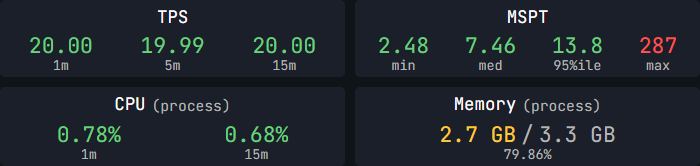
Once a round finishes and players return to the lobby, the World Factory executes an automated cleanup sequence. The match Overworld, Nether, and End worlds are unlinked and wiped from the server storage drive completely. Server administrators never have to write bash cron jobs or manually delete gigabytes of abandoned match folders [2].
Multi-Dimension Parity: Linked Nether and On-Demand End
Target items in higher difficulty brackets frequently require resources located outside the Overworld, such as Blaze Rods, Nether Bricks, or Shroomlight. Many older minigame plugins break Nether exploration entirely by teleporting players to the main server Nether or generating disconnected dimensions with mismatched terrain seeds.
FindTheBlock resolves dimensional parity by creating paired Overworld (ftb_<id>) and Nether (ftb_<id>_nether) dimensions generated from the exact same random 64-bit seed [2].
Nether portals function exactly like vanilla Minecraft:
- Lighting an obsidian frame inside the match Overworld teleports the player to coordinates divided by eight (
X / 8, Z / 8) inside that match's unique Nether instance. - Constructing a portal within the Nether returns the player back to their corresponding Overworld coordinates (
X * 8, Z * 8). - Players cannot escape into outside survival worlds, and players from concurrent matches never cross into another match's Nether instance.
To preserve hardware efficiency, FindTheBlock treats the End dimension on-demand [2]. If a match requires end-tier materials (such as Purpur Blocks or Shulker Shells), the End dimension (ftb_<id>_the_end) remains unloaded until a player activates an End Portal frame with twelve Eyes of Ender and steps into the portal. If no runner reaches the End during a match, that world is never loaded into server RAM, saving CPU cycles on entities and unneeded dimension ticks.
Gameplay Mechanics: Match Flow, Difficulty Tiers, and Anti-Stall Buffs
FindTheBlock structures match progression across four distinct lifecycle states: LOBBY, STARTING, IN_GAME, and ENDING [3].
┌─────────┐      /start       ┌──────────┐   Countdown &   ┌─────────┐     Item Found     ┌────────┐
│  LOBBY  │ ────────────────> │ STARTING │ ──────────────> │ IN_GAME │ ─────────────────> │ ENDING │
└─────────┘                   └──────────┘     Roulette    └─────────┘    or /ftb stop    └────────┘
     ▲                                                                                         │
     └──────────────────────── Auto-Cleanup & Lobby Return ────────────────────────────────────┘
The Three Difficulty Tiers
Server administrators and party leaders can adjust match complexity using three curated item tiers [4]:
| Tier | Score | Target Block Examples | Primary Sourcing Environments |
|---|---|---|---|
| EASY | 1 pt | Diamond Ore, Amethyst Block, Calcite, Dripstone, Moss, Packed Ice, Magma, Red Sand, Podzol | Surface biomes, shallow caves, lush caves |
| NORMAL | 3 pts | Ancient Debris, Crying Obsidian, Sea Lantern, Prismarine, Shroomlight, Nylium, Resin, Sculk, Sponge | Nether bastions, ocean monuments, Trial Chambers, deep mining |
| HARD | 5 pts | Mob Heads, Heavy Core, Shulker Box, Netherite Block, Beacon, Ender Chest, Lodestone, Chorus Flower, Mycelium | The End dimension, boss fights, mace crafting, rare biomes |
In-Game Recipe Guidance (/recipe)
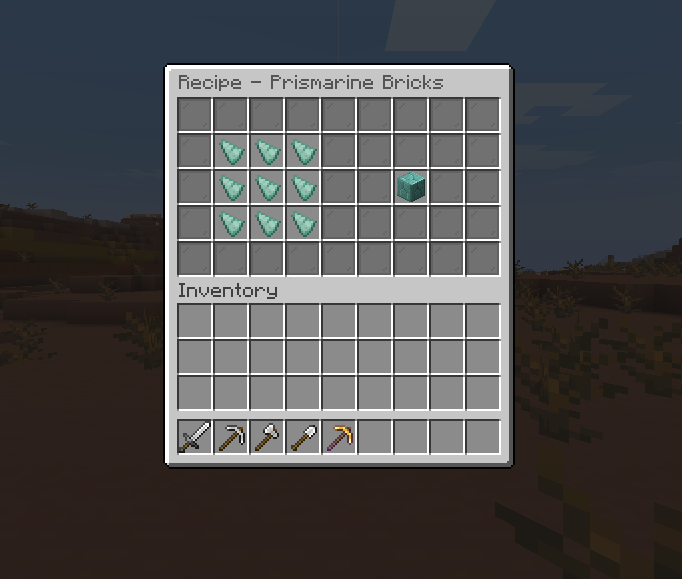
Memorizing complex recipes across hundreds of Minecraft 1.21 items can be daunting for casual players. FindTheBlock includes a native recipe viewer GUI. Players can type /recipe during an active match to open an interactive 3x3 crafting grid showing the exact ingredient arrangement required for their assigned target item [4]. This prevents players from alt-tabbing to web browsers or external wikis, keeping them immersed in the competition.
Pacing Acceleration: 20-Minute Milestone Buffs
To prevent matches from stalling indefinitely when target blocks prove elusive, FindTheBlock incorporates an automatic pacing engine. When an active match crosses the 20-minute mark, all surviving competitors automatically receive two permanent status effects [5]:
- Speed II: Boosts sprint velocity, allowing runners to traverse vast biomes, locate ocean monuments, and discover trial chambers rapidly.
- Regeneration I: Provides passive health restoration, reducing downtime spent cooking food or hiding from hostile mobs.
These buffs persist until a winner emerges, guaranteeing that games conclude within reasonable tournament timeframes without admin intervention.
Player Retention Features: Crash Reconnect & Party System
Network instability and client crashes can ruin competitive matches on community servers. FindTheBlock incorporates a dedicated reconnect engine to protect player progress [6].
The 60-Second Crash Grace Window
If a player disconnects due to client crash, network timeout, or server restart during an active match:
- The player's exact coordinates, health, hunger, and inventory contents are locked in server cache.
- A 60-second grace window begins immediately [6].
- If the player reconnects before the 60 seconds expire, they bypass the lobby and respawn directly at their match coordinates with all equipment intact.
- If the countdown reaches zero without a reconnection, their session expires safely, returning them to the lobby on their next login.
Late Joiners & Spectator Mode
When new players join a server where a match is currently underway, FindTheBlock provides clickable chat options [6]:
- Run
/join: Latecomers scatter into the running match as active runners (if enabled inconfig.yml). - Run
/spectate: Players enter spectator mode with an interactive compass to teleport between active runners and monitor the race. - Wait in Lobby: Players remain on the lobby platform and chat until the next match countdown begins.
Party Hub & Public Party Finder
FindTheBlock contains a complete party management system accessible via /party or /p [7]. Players can form private squads, invite friends (/party invite <player>), and toggle their party to public or private. Solo players browsing the lobby can run /party finder to open an interactive GUI displaying open parties, member counts, and party leaders, making match discovery effortless on public networks.
Installing and Configuring the Minecraft Minigame on Paper & Purpur (1.21.4+)
Deploying FindTheBlock on your server requires no external database setup or complex dependency chains [1]. The plugin is built specifically for modern Paper pipelines and is fully compatible with Paper, Purpur, and any Paper-based fork running Minecraft 1.21.4 or higher.
1. Requirements & Prerequisites
- Server Platform: Paper, Purpur, and all standard Paper-based forks (Gale, Pufferfish, etc.) running Minecraft 1.21.4 or higher. Important: Folia is explicitly unsupported due to regional multithreading conflicts.
- Minecraft Version: 1.21.4+ (all versions above 1.21.4 are fully supported; legacy 1.21.1 builds are not supported).
- Runtime: Java 21 LTS.
- Optional Dependencies: PlaceholderAPI (for scoreboard and tab list integrations) [8].
2. Basic Installation
- Download
FindTheBlock-1.0.0.jarand place it into your server'splugins/directory [1]. - Restart your server to initialize default configuration files in
plugins/FindTheBlock/. - Join your server and grant administrative permissions via console:
/op <your_username>.
3. Choosing Your Lobby Environment
FindTheBlock supports two distinct lobby configurations:
Option A: Default Auto-Generated Void Lobby
By default, the plugin automatically constructs a dedicated void world named ftb_lobby [9]:
- A 100x100 bedrock platform centered at coordinates
(0, 100, 0). - Automatic void catch protection: Any player falling below
Y = 90is caught two blocks before void damage and teleported back to center spawn (X = 0.5, Y = 101.0, Z = 0.5) with zero fall damage [9]. - Built-in rules: PvP disabled, weather locked to clear daylight, hunger drain disabled, and block modification prohibited.
Option B: Integrating a Custom Lobby World
If your server already features a custom lobby build or hub world, you can connect it easily [10]:
- Open
plugins/FindTheBlock/config.yml. - Locate the
lobbyconfiguration section:lobby: world-name: "my_custom_hub" platform: auto-generate: false - Join the server, navigate to your desired lobby spawn location, and execute
/setworldspawn[10]. - Run
/ftb reloador restart your server.
FindTheBlock automatically applies keepInventory, disables block damage, and activates void fall catch protection on your custom world spawn without building the bedrock platform [10].
4. Deploying Floating Leaderboards & PlaceholderAPI
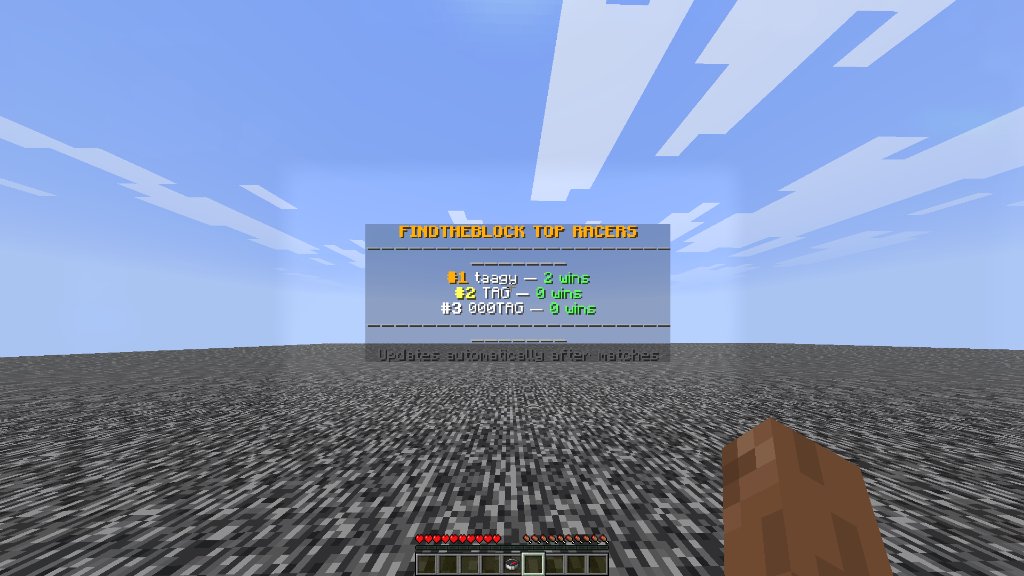
To showcase top performers, administrators can position in-world floating hologram leaderboards anywhere in their lobby [7]:
/ftb leaderboard spawn wins
/ftb leaderboard spawn time
To remove an unwanted leaderboard display, stand within ten blocks and run /ftb leaderboard remove.
For servers using custom scoreboards, chat formatters, or tab lists, FindTheBlock exposes rich PlaceholderAPI tokens [8]:
%findtheblock_state_display%: Current game phase (In GameorLobby).%findtheblock_target%: Active target block name (ANCIENT_DEBRIS).%findtheblock_time%: Elapsed match timer (05:42).%findtheblock_contestants%: Count of active runners.%findtheblock_wins%: Total career wins for the viewing player.%findtheblock_top_1_name%: Current top-ranked player on the server network.
Frequently Asked Questions
What server software and Minecraft versions are required to run FindTheBlock?
FindTheBlock requires Minecraft 1.21.4 or higher running on Java 21 LTS [1]. It fully supports Paper, Purpur, and all standard Paper-based server forks. Note that legacy 1.21.1 builds and legacy Spigot/CraftBukkit software are not supported.
Does FindTheBlock support Folia or regional multithreaded cores?
No, FindTheBlock does not support Folia. While it runs smoothly on Paper, Purpur, and standard Paper forks on 1.21.4+, Folia's regionized multithreading model splits world ticks across independent threads, which conflicts with the synchronized World Factory and cross-dimension player tracking required for item-rush matches.
How does FindTheBlock prevent server lag when creating match worlds?
The plugin incorporates an asynchronous World Factory that limits chunk creation and lighting calculations to 30 chunks per second [2]. This background pacing prevents main-thread tick spikes, maintaining server performance at a locked 20.0 TPS throughout world generation.
Can players travel through Nether portals during a match?
Yes. Every match generates a linked Overworld and Nether sharing the exact same world seed [2]. Players can construct obsidian frames and travel between dimensions using vanilla X/8 and X*8 coordinate ratios without crossing into other match instances.
What happens if a player loses connection during a match?
FindTheBlock retains the disconnected player's coordinates, inventory, and health status for 60 seconds [6]. Reconnecting within this grace period returns the player directly to their active match location. If the grace period expires, they spawn safely in the lobby.
References
- FindTheBlock Project Contributors, “FindTheBlock Documentation: Overview and Quick Start”, FindTheBlock Official Docs (GitHub), 2026.
- FindTheBlock Architecture Team, “World Generation, Nether Parity, and Dimension Lifecycle”, FindTheBlock GitHub Repository, 2026.
- FindTheBlock Core Engine, “Match Flow and Lifecycle State Machine”, Modrinth Plugin Release, 2026.
- FindTheBlock Game Design Team, “Difficulty Tiers and Recipe Viewer Configuration”, FindTheBlock Official Docs (GitHub), 2026.
- FindTheBlock Gameplay Mechanics, “20-Minute Milestone Pacing Buffs”, Modrinth Plugin Release, 2026.
- FindTheBlock Resilience Team, “Crash Reconnect Engine and Late Joiner Handling”, FindTheBlock Source Repository, 2026.
- FindTheBlock Command Reference, “Commands, Party Hub, and Permissions”, FindTheBlock Official Docs (GitHub), 2026.
- FindTheBlock Integration Reference, “PlaceholderAPI Expansion Tokens”, FindTheBlock Official Docs (GitHub), 2026.
- FindTheBlock Configuration Guide, “Void Lobby Platform Specs and Protection”, FindTheBlock Official Docs (GitHub), 2026.
- FindTheBlock Configuration Guide, “Paper Server Architecture & Custom Lobby World Integration”, PaperMC & FindTheBlock Docs, 2026.
Related Server Guides
-
Why CoreProtect Beats Claim Shovels: No-Grief Minecraft SMP Guide
-

MoonCycle Plugin: 8 Lunar Phases & Consensual PvP Rules
-
BTeam Plugin: Vanilla-Friendly Teams, Chat & Alliances

